---
source_url: "https://blog.expertrec.com/google-custom-search-json-api-simplified/"
title: "Google Custom Search JSON API Pricing: Costs, Limits & 2026 Guide"
mirrored_at: 2026-08-12T15:03:51.053Z
host: blog.expertrec.com
cited_in_42a: true
mirror_canonical: "https://index.42a.ai/blog.expertrec.com/google-custom-search-json-api-simplified/index"
---
> **Original source:** https://blog.expertrec.com/google-custom-search-json-api-simplified/
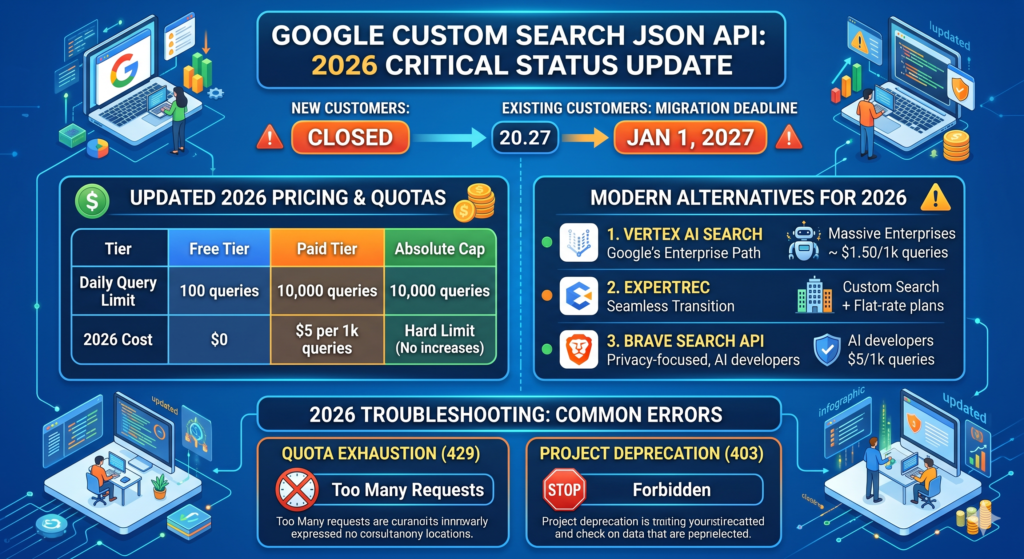
**⚠️ Important Update:** Google has **closed the Custom Search JSON API to new customers**. Existing users have until **January 1, 2027** to transition to an alternative. [Source: Google Developers](https://developers.google.com/custom-search/v1/overview)
The Google Custom Search JSON API lets developers programmatically retrieve search results from a [Programmable Search Engine](https://programmablesearchengine.google.com/) via RESTful GET requests, returning results in JSON format. This guide covers everything you need to know: setup, all API parameters, response structure, code examples, pricing, error handling, and what to do now that the API is sunsetting.
**Trusted Website Search by 10,000+ Sites** Deliver fast, AI-powered search results that help visitors find content instantly and convert better. ⭐ 4.8/5 Rating 🔒 GDPR Compliant ⚡ 5 Min Setup [Try ExpertRec Free →](https://cse.expertrec.com/?platform=cse) No credit card required • Free setup
## 
## API Deprecation: What’s Happening?
Google officially closed the Custom Search JSON API to new signups in 2025. Here’s the timeline:
- **New customers:** Cannot sign up for the Custom Search JSON API anymore.
- **Existing customers:** Have until **January 1, 2027** to migrate to an alternative.
- **Google’s recommendation:** [Vertex AI Search](https://docs.cloud.google.com/generative-ai-app-builder/docs/migrate-from-cse) for site-restricted search (up to 50 domains). Requires full Google Cloud setup and enterprise pricing.
- **Site Restricted JSON API:** Already discontinued as of January 2025.
If you’re an existing user, your API keys still work – but you should start planning your migration now. We cover [alternatives and migration options](#alternatives) below.
## What Is the Google Custom Search JSON API?
The Custom Search JSON API is a RESTful API that returns Google search results in JSON format. It works with Google’s Programmable Search Engine and allows developers to build custom search interfaces for websites and applications.
- Web search and image search results
- Site-restricted or multi-site search
- JSON responses following the OpenSearch 1.1 specification
- Custom UI with Google-powered results
## Setup: Before You Begin
You need three things: a Programmable Search Engine, its CX ID, and an API key.
### 1\. Create a Programmable Search Engine
1. Visit [cse.google.com](https://cse.google.com/) and click **Create**.
2. Add your website URL(s) – you can include specific pages, entire domains, or multiple sites.
3. Configure language and region settings.
4. Click **Create** to finish setup.
### 2\. Get Your Search Engine ID (CX)
The CX ID uniquely identifies your Programmable Search Engine.
1. Open the [search engine control panel](https://programmablesearchengine.google.com/controlpanel/all).
2. Select your search engine and go to **Basics → Details**.
3. Copy the **Search engine ID** – this is your `cx` parameter.
### 3\. Get Your API Key
1. Go to the [Custom Search JSON API overview](https://developers.google.com/custom-search/v1/overview).
2. Click **Get a Key** (note: this is no longer available for new customers).
3. Select or create a Google Cloud project.
4. Copy and **restrict your API key** to the Custom Search API only (for security).
## API Endpoint & Request Format
All requests use a single GET endpoint:
```
GET https://www.googleapis.com/customsearch/v1
```
### Required Parameters
Parameter
Description
`key`
Your API key
`cx`
Search Engine ID
`q`
Search query string
### All Optional Parameters
Parameter
Description
Example
`num`
Results per page (1-10, default 10)
`5`
`start`
Pagination offset (1-based, max 91)
`11`
`searchType`
Set to `image` for image search
`image`
`fileType`
Filter by file type
`pdf`
`dateRestrict`
Restrict results by date
`d7` (last 7 days)
`exactTerms`
Phrase that must appear in results
`machine learning`
`excludeTerms`
Words to exclude from results
`free`
`siteSearch`
Restrict to or exclude a specific site
`example.com`
`siteSearchFilter`
`i` (include) or `e` (exclude) siteSearch
`i`
`lr`
Language restriction
`lang_en`
`cr`
Country restriction
`countryUS`
`gl`
Geolocation (country code)
`us`
`safe`
Safe search level
`active`
`sort`
Sort expression
`date`
`filter`
Duplicate content filter (`0` or `1`)
`1`
`rights`
License filter
`cc_publicdomain`
`imgSize`
Image size filter (image search only)
`large`
`imgType`
Image type filter
`photo`
`imgColorType`
Image color type
`color`
`imgDominantColor`
Dominant color filter
`blue`
`hq`
Appends terms to query
`tutorial`
`orTerms`
OR terms for the query
`guide|tutorial`
`hl`
Interface language
`en`
### Sample Request
```
https://www.googleapis.com/customsearch/v1?
key=YOUR_API_KEY
&cx=YOUR_CX_ID
&q=site+search+api
&num=10
&dateRestrict=m6
```
## Response Structure
The API returns a JSON object with search metadata, engine metadata, and an array of results. Here’s an annotated example:
```
{
"kind": "customsearch#search",
"searchInformation": {
"totalResults": "54200",
"searchTime": 0.32
},
"queries": {
"request": [{ "totalResults": "54200", "searchTerms": "site search api", "count": 10, "startIndex": 1 }],
"nextPage": [{ "totalResults": "54200", "searchTerms": "site search api", "count": 10, "startIndex": 11 }]
},
"items": [
{
"title": "Page Title",
"htmlTitle": "Page Title",
"link": "https://example.com/page",
"displayLink": "example.com",
"snippet": "A short text excerpt from the page...",
"htmlSnippet": "A short text excerpt from the page...",
"cacheId": "abc123xyz",
"pagemap": {
"cse_thumbnail": [{ "src": "https://example.com/thumb.jpg", "width": "120", "height": "120" }]
}
}
]
}
```
**Key response fields:**
- `searchInformation.totalResults` – total matching results (returned as a string).
- `searchInformation.searchTime` – query execution time in seconds.
- `queries.nextPage` – use the `startIndex` value for pagination.
- `items` – array of up to 10 results per request.
- `pagemap` – structured data including thumbnails, if available.
## Pagination
The API returns a maximum of **10 results per request**. To get more results, use the `start` parameter:
- Page 1: `start=1` (default)
- Page 2: `start=11`
- Page 3: `start=21`
The maximum value for `start` is **91**, meaning you can retrieve up to 100 results total (10 pages × 10 results). The `queries.nextPage` field in the response provides the correct `startIndex` for the next page.
## Code Examples
### Python
```
import requests
API_KEY = "YOUR_API_KEY"
CX_ID = "YOUR_CX_ID"
def search(query, start=1):
resp = requests.get(
"https://www.googleapis.com/customsearch/v1",
params={"key": API_KEY, "cx": CX_ID, "q": query, "start": start, "num": 10}
)
resp.raise_for_status()
return resp.json()
# Fetch first page of results
data = search("site search api")
for item in data.get("items", []):
print(f"{item['title']} - {item['link']}")
# Paginate to get more results
if "nextPage" in data.get("queries", {}):
next_start = data["queries"]["nextPage"][0]["startIndex"]
page2 = search("site search api", start=next_start)
```
### JavaScript (Node.js)
```
const API_KEY = "YOUR_API_KEY";
const CX_ID = "YOUR_CX_ID";
async function search(query, start = 1) {
const url = new URL("https://www.googleapis.com/customsearch/v1");
url.searchParams.set("key", API_KEY);
url.searchParams.set("cx", CX_ID);
url.searchParams.set("q", query);
url.searchParams.set("start", start);
url.searchParams.set("num", 10);
const resp = await fetch(url);
if (!resp.ok) throw new Error(`API error: ${resp.status}`);
return resp.json();
}
// Usage
const data = await search("site search api");
data.items?.forEach(item => console.log(`${item.title} - ${item.link}`));
```
### cURL
```
curl "https://www.googleapis.com/customsearch/v1?key=YOUR_API_KEY&cx=YOUR_CX_ID&q=site+search+api&num=10"
```
## Pricing & Quota Limits
Tier
Queries
Cost
Free tier
100 per day
$0
Paid tier
Up to 10,000 per day
$5 per 1,000 queries
Hard cap
10,000 per day maximum
Cannot exceed even with billing
Enable billing in the [Google Cloud Console → API Dashboard](https://console.cloud.google.com/apis/dashboard) to move beyond the free tier. Monitor usage there or set up alerts via Google Cloud Operations. **Cost at scale:** At 10,000 queries/day, you’d pay $50/day or roughly **$1,500/month**. For high-traffic sites, this adds up fast – especially compared to flat-rate alternatives.
## Error Codes & Troubleshooting
Error
Cause
Fix
`403 Forbidden`
Invalid API key, wrong CX, or API not enabled
Verify key and CX in Cloud Console; ensure Custom Search API is enabled
`429 Too Many Requests`
Daily quota or per-minute rate limit exceeded
Implement exponential backoff; check quota in API Dashboard; enable billing
`400 Bad Request`
Missing required parameter or invalid value
Check that `key`, `cx`, and `q` are all present and valid
Empty `items`
No results match the query for your search engine
Verify your PSE includes the right sites; try a broader query
For rate limit errors, use **exponential backoff**: wait 1 second, then 2, then 4, doubling each retry. The daily quota resets at midnight Pacific Time.
## Limitations
- **Maximum 10 results per request** – cannot be increased.
- **Maximum 100 results per query** – pagination caps at `start=91`.
- **10,000 queries/day hard cap** – even with billing enabled.
- **Ads may appear** in free-tier results.
- **No real-time indexing** – results depend on Google’s crawl schedule.
- **Closed to new customers** – no new API keys can be created.
- **Sunsetting January 2027** – existing users must migrate.
## Alternatives & Migration Options
With the API closing, here are your main options:
### 1\. Vertex AI Search (Google’s Recommendation)
Google recommends [Vertex AI Search](https://docs.cloud.google.com/generative-ai-app-builder/docs/migrate-from-cse) as the official replacement. It supports site-restricted search for up to 50 domains with AI-powered features like summaries and extractive answers. However, it requires a full Google Cloud setup, OAuth 2.0 authentication, and enterprise-level pricing – overkill for most use cases that relied on the simplicity of the JSON API.
### 2\. ExpertRec (Flat-Rate Site Search)
[ExpertRec](https://www.expertrec.com/content-search-for-custom-stack/) is purpose-built for site search and is a direct replacement for the Custom Search JSON API. Key differences:
- **Pricing by pages indexed** – from $49/mo for up to 1,000 pages and 50K search requests. Higher tiers offer 100K and 200K requests, with custom limits for larger sites.
- **[AI-powered search](https://www.expertrec.com/features/#ai-site-search)** – autocomplete, typo tolerance, semantic search, and search analytics built in.
- **[JavaScript rendering](https://www.expertrec.com/features/#ai_content_search)** – crawls and indexes JS-heavy pages (React, Angular, Vue) that Google CSE often misses.
- **[PDF and document indexing](https://www.expertrec.com/features/#integrations)** – search inside PDFs, DOCs, and other file types.
- **5-minute setup** – add a code snippet, and search works immediately.
### Google Custom Search JSON API vs ExpertRec
Feature
Google Custom Search API
ExpertRec
Status
Closed to new customers; sunsetting Jan 2027
Active, accepting new customers
Pricing model
Per query ($5/1,000)
Per pages indexed (from $49/mo)
Search request limits
10,000/day hard cap
50K-200K/mo (plan-based, custom limits available)
Autocomplete
No
Yes (built-in)
JS rendering
No
Yes
PDF & document indexing
No
Yes
Search analytics
Basic
Full dashboard + GA4 integration
Ads in results
Yes (free tier)
No
Best for
Legacy integrations (existing users only)
Sites needing 10K+ queries/mo with AI search, autocomplete, or document indexing
## Related Google Custom Search Guides
- [Google Custom Search API Guide](https://blog.expertrec.com/google-custom-search-api/)
- [Google Custom Search API Daily Limits Explained](https://blog.expertrec.com/google-custom-search-api-daily-limit-exceeded/)
- [How to Find Your Search Engine CX ID](https://blog.expertrec.com/how-to-get-your-google-custom-search-id-cx-id/)
- [Google Custom Search Pricing – Full Breakdown](https://blog.expertrec.com/site-search-pricing-google-cse-replacement/)
**What is the Google Custom Search JSON API?**
The Google Custom Search JSON API is a RESTful API that lets developers programmatically retrieve search results from Google Programmable Search Engines. It returns results in JSON format and supports web search, image search, and site-restricted search. Note: the API is now closed to new customers.
**Is the Google Custom Search JSON API still available?**
The API is closed to new customers as of 2025. Existing users can continue using it until January 1, 2027, after which they must migrate to an alternative like Vertex AI Search or ExpertRec.
**How much does the Google Custom Search JSON API cost?**
The API offers 100 free queries per day. Beyond that, it costs $5 per 1,000 queries, up to a hard cap of 10,000 queries per day. At maximum usage, that’s roughly $1,500/month.
**What are the daily limits of the Google Custom Search JSON API?**
The free tier allows 100 queries per day. With billing enabled, the limit increases to 10,000 queries per day at $5 per 1,000 queries. This is a hard cap that cannot be increased further.
**What is the best alternative to Google Custom Search JSON API?**
ExpertRec is a popular alternative that offers plan-based search limits starting at 50K requests/mo ($49/mo), AI-powered results, autocomplete, PDF indexing, and JS rendering. Higher tiers offer 100K and 200K requests, with custom limits for larger sites. Vertex AI Search is Google’s official recommendation but requires enterprise-level Google Cloud setup.
**What is the maximum number of results from Google Custom Search JSON API?**
Each API request returns a maximum of 10 results. Using pagination (the start parameter), you can retrieve up to 100 results total per query. The start parameter accepts values from 1 to 91.
As of 2026, the Google Custom Search JSON API is no longer available to new users and will be fully deprecated by January 1, 2027, making it critical for existing users to plan migration. The API still offers 100 free queries per day, with additional usage priced at $5 per 1,000 queries, up to a hard cap of 10,000 daily requests. For example, a website handling 5,000 searches per day would incur approximately $24.50 daily after the free quota, while a site with 50,000 monthly searches may pay around $235 per month. Due to these limits and rising costs at scale, many developers in 2026 are shifting to alternatives like Vertex AI Search or ExpertRec for more flexible and scalable search solutions.